Integrating Master Data
When integrating master data, entity definitions are kept minimal to support different item and price types for various purposes. This avoids bloated models and allows flexibility for different ERP and PIM systems.
The extensible model lets Hii Retail consume data from any ERP system, adapting to customer needs.
The limiting factor is often the end consumer of the data (e.g., POS or app), which is customer-specific. Hii Retail provides flexibility for each customer.
Integration is currently via REST APIs, using specified formats.
A typical integration scenario:
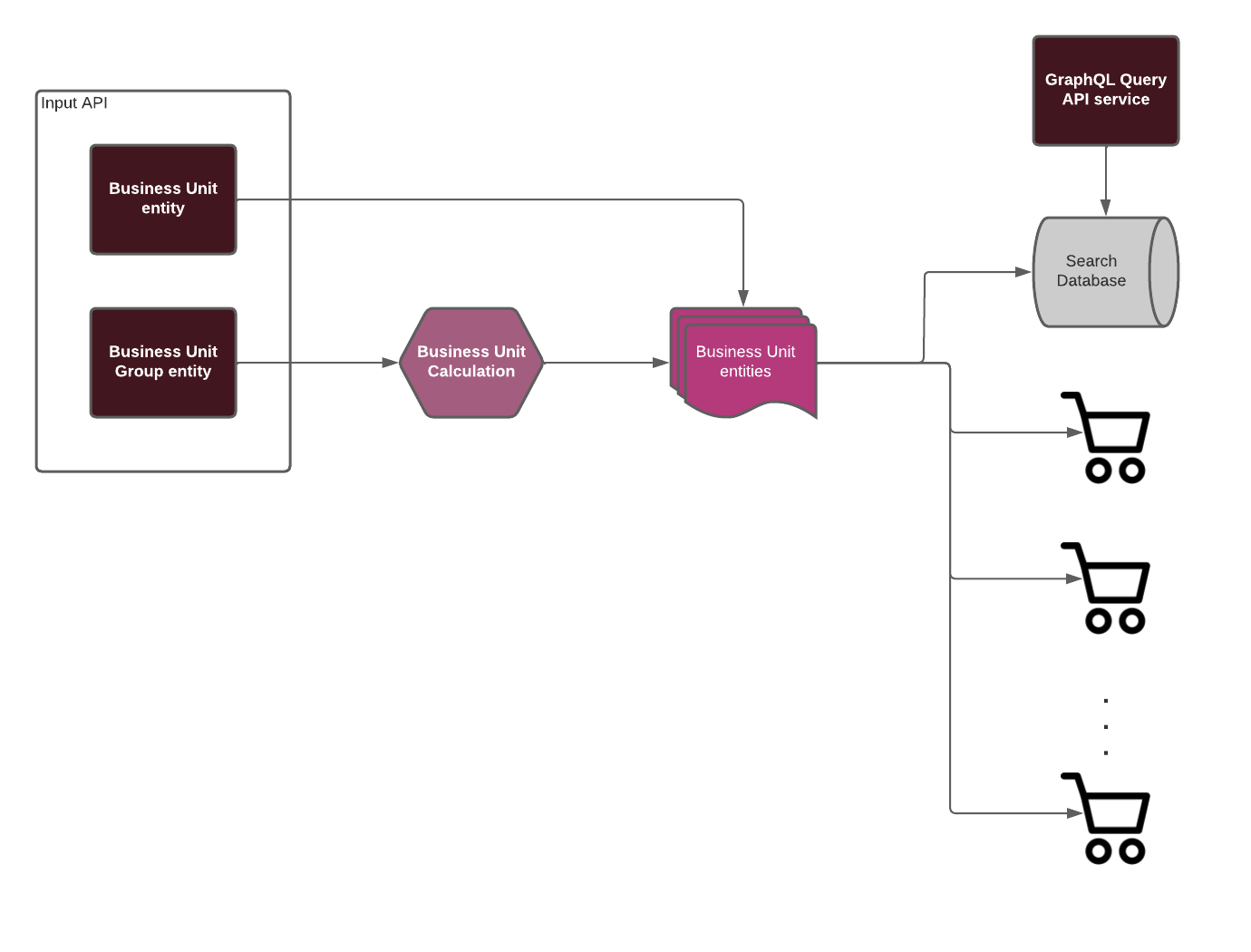
Hii Retail is based on GS1 standards, modeling entities to match real-world retail data.
Entities include Items, Prices, and Promotions. Each represents master data in a store. The model reflects real-world entities: an Item has a name, description, type, category, net content, and unit of measure. Supplier and price are handled separately.
Items and prices have separate data flows. Price Specification supports multiple price types and time periods.
Suppliers are linked to replenishment, not directly to Items.
Depending on your requirements, you may need to integrate some or all entities. For simple use cases, only Items may be needed; for full master data management, all entities may be required.
If you need to represent a supplier with an Item, but only require simple Items, you can use Additional Properties to extend the entity.
We recommend providing a unique Correlation-Id in all requests. This header is accepted by all APIs and is used for tracing data through downstream services.
Integration Approaches
Retailers often organize stores (Business Units) into groups or hierarchies based on size, location, or operational needs. For example, city-center stores may require different pricing than rural stores, or shopping centers may need a different assortment than corner shops.
Hii Retail supports two integration approaches. Choose based on where your hierarchy management lives:
| Business Unit-specific | Business Unit Group | |
|---|---|---|
| Who manages grouping? | Your ERP/PIM | Hii Retail |
| Data sent | Fully prepared per Business Unit | At group level; Hii Retail calculates per-BU output |
| Best for | ERP systems that already generate BU-specific output | Minimizing data sent from ERP; large data volumes |
Business Unit-Specific Data
Use these endpoints when your ERP or PIM generates data for each Business Unit in your organization. Data sent to Hii Retail should be complete and ready for downstream distribution.
Integration Requirements
- All data in POST or PUT requests must be complete.
- The Business Unit ID must exist downstream; Hii Retail does not validate this before distribution.
- PATCH or DELETE requests have no effect if the specified data does not exist.
- PATCH requests update individual properties of existing data.
- If a Business Unit Group ID is provided to these endpoints, no actions are taken and no outputs are generated.
API Documentation
- Business Unit-Specific Endpoints for Items
- Business Unit-Specific Endpoints for Price Specifications
- Business Unit-Specific Endpoints for Item Identifiers
- Business Unit-Specific Endpoints for Item Links
- Business Unit-Specific Endpoints for Promotions
- Business Unit-Specific Endpoints for Content Declarations
Business Unit Group Data
Use these endpoints when your organization uses a hierarchy to manage data differences across Business Units, and your ERP or PIM cannot generate Business Unit-specific outputs.
Another use case is when you want to minimize data sent from your ERP, letting Hii Retail handle large data volumes close to distribution services.
Requirements and Restrictions
- All data in POST or PUT requests must be complete for the given Business Unit Group and all sub-Business Units.
- The Business Unit Group ID must exist in Hii Retail's Business Unit Management system.
- PATCH or DELETE requests update or delete all sub-entities, regardless of overrides at lower levels.
- If a Business Unit ID is provided, the action applies only to that Business Unit (subject to change).