Inheritance in Hii Retail Master Data Processing
Hii Retail uses inheritance: information set higher in a hierarchy is inherited by underlying entities.
The hierarchical structure of Business Unit Groups should be maintained as Business Units are created, removed, or moved.
When an entity is associated with a Business Unit Group (via businessUnitGroupId), its data is inherited by all underlying Business Units.
This logic applies at any hierarchy level. Information set lower in the hierarchy applies from that level downward, allowing for specific data for different groups.
Overrides
Inheritance applies to most entities, but there are exceptions.
Inheritance makes it easy to propagate entity details to all Business Units, but sometimes you need to replace or override data for parts of the hierarchy. For example, you may want to force an entity to all underlying Business Units, even if they have a local definition. This is common for entities like Price Specifications.
Item example
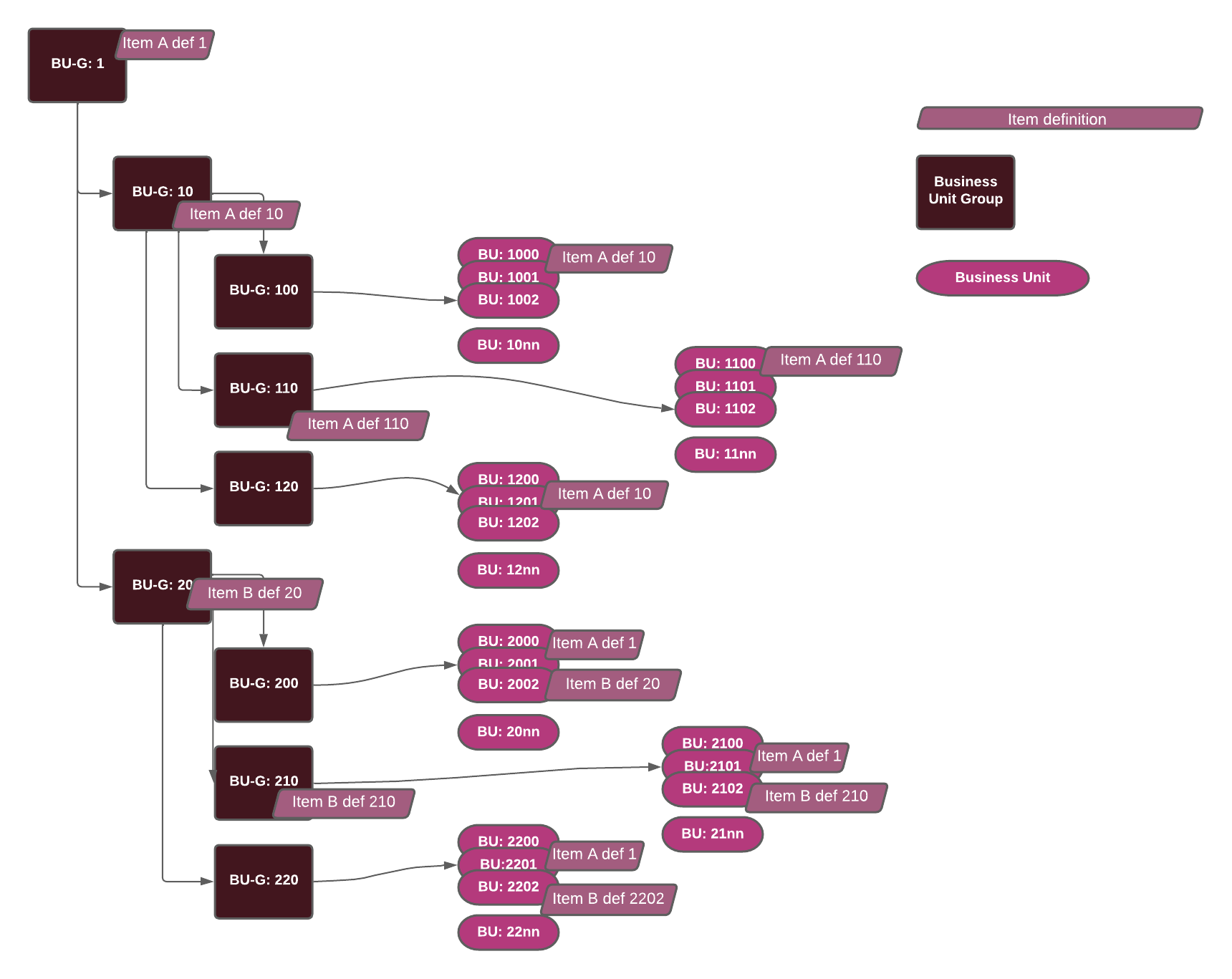
This example shows that an overall definition of an Item can be applied to the entire organization, but variations can be applied to certain parts and not others.
You might want to use a specific version of the Item for some Business Units since these have a more demanding audience or they might have different legal requirement that must be fulfilled. Or more commonly, it might be that a particular chain/branch in your organization have additional information needed to satisfy some hardware in their stores. It might even be as simple as having different language in different parts of the organization.
Price Specification example
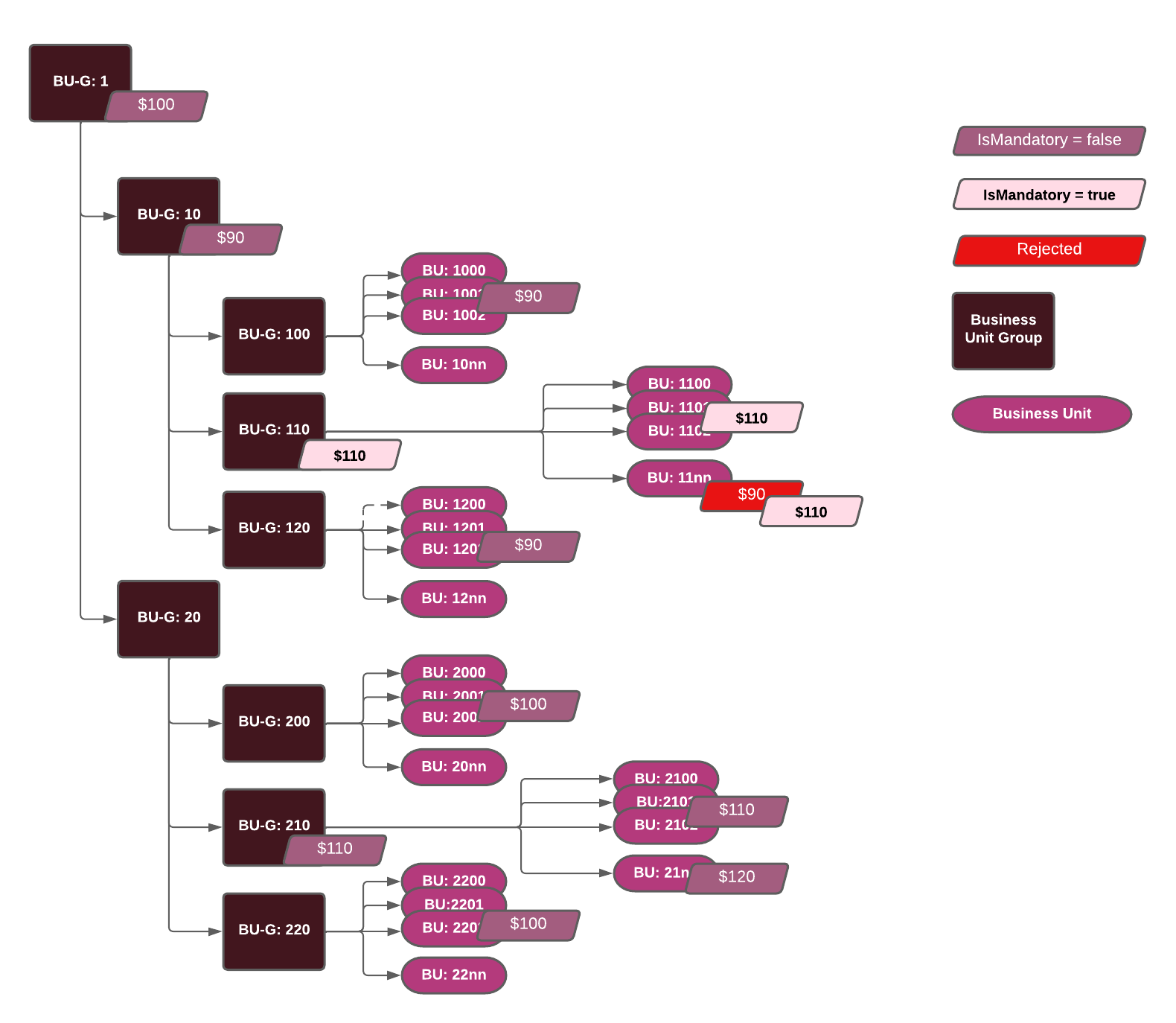
For example you might want to enforce a version of an entity to a group of Business Units even if they have a version defined closer in the Business Unit Group hierarchy. This is illustrated in the example above for Business Unit Group 110 where the general price is $90, inherited from Business Unit Group 10, but Business Unit 11nn has also a locally defined price of $90, which is overridden by the price defined as
IsMandatory = trueon Business Unit Group 110.
Cross-Entity Inheritance
Some entities propagate inherited data to other entities. For example, Item Categories can assign default properties that are inherited by all Items in that category.
Item Categories example
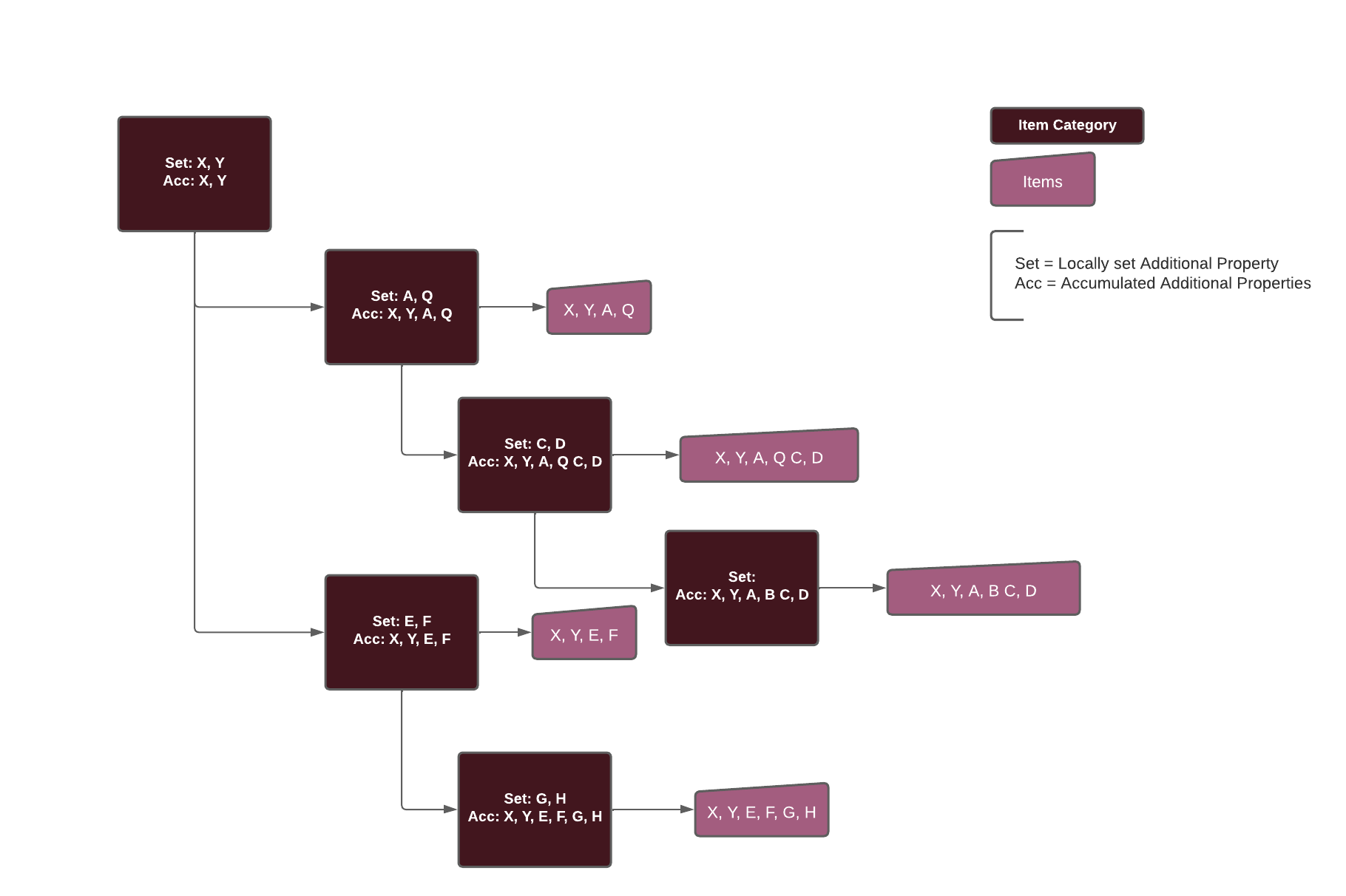
This example illustrates that your Item Category hierarchy can be set up to contain some default information that is essential for all Items in that category. This might be something like
Minimum Temperaturefor all refrigerated Items (Milk, yoghurt, cheese, etc.) or it might be specific content for allLED TVslikeScreen size (inches),Resolution,VESA mount, etc. It might even be legal requirements that only apply for specific Items likeAge Restrictionfor all Alcoholic beverages or tobacco products.
Item Inheritance in Detail
In Hii Retail, inheritance means data defined at a Business Unit Group is inherited by all underlying Business Units.
An Item created at the top level is available to all Business Units unless overridden lower in the hierarchy.
Item A
- Item A definition 1 is created at the top level and propagated to all Business Units without a lower-level override (BUs 2000–20nn and 2200–22nn).
- Business Units 1000–10nn and 1201–12nn have Item A definition 10, and 1100–11nn + 1200 have Item A definition 110, assigned to Business Unit Groups 10 and 110, replacing the higher-level definition.
Item B
- Item B definition 20 is created for Business Unit Group 20, so it is not present in Business Units under Group 10, only under Group 20.
- Business Unit Group 210 has its own definition of Item B, so 2100–2102 have this definition.
- Business Unit 2202 has its own local variant.
Moving a Business Unit
If a Business Unit is moved to a different group, Item details are recalculated and updated based on the new assignment.
Keep Business Unit management up-to-date in the Business Unit Management service for correct inheritance.