Importing rates from the European Central Bank
The European Central Bank (ECB) publishes a reference rate against the euro for the major currencies every
business day. With the auto-import switched on, Exchange Rates fetches those rates every night and keeps the
stores' SALES rates up to date, so nobody has to type them.
Switching it on
The auto-import is switched on in the Configuration Portal, with Enable automated exchange rates, for the whole company, a group of stores or one store. See Switching the ECB import on and off.
- A level without a setting of its own follows the nearest level above it. Switch it on for the whole company and every group and store has it on, unless one of them switches it off.
- Nothing is imported until it is switched on somewhere.
- The level needs at least two currencies in Currency: a rate is always between two of them.
- The first rates arrive with the next nightly run, so allow up to 24 hours.
The import cannot be switched on through the API.
What it imports
The bank prices everything in euros
The ECB gives the price of one euro in each currency. Exchange Rates works out the rates between the other currencies from those, so a Swedish store that takes Norwegian kroner gets its rate too.

All the currencies the importing stores need are fetched in one request, and the rates are saved to six decimals.
Only rates with the home currency
In a Swedish store every conversion goes through kronor, the store's home currency. The home currency is the default currency chosen for that level in Currency, see The default currency. The import creates, for each other currency the level takes, a rate between it and the home currency, in both directions.

- There is never a rate between two foreign currencies. A Swedish store would only need a rate from euros to Norwegian kroner if it took euros and gave change in kroner, which is not how a till works. Three currencies therefore give 4 rates, and five give 8.
- Both directions are imported, so no one reading the rates has to turn one round.
- The import creates
SALESrates only.PURCHASEandINTERCOMPANYrates always come from the ERP.
⚠ Every level where the import is on needs a home currency. A level that has no default currency, or whose default currency is not one of the currencies it takes, gets nothing imported until that is fixed. A level inherits the default currency of the level above it, so setting it once for the whole company is usually enough.
Where the rates are saved
Each level saves only the rates that its own currencies add. Everything else it inherits from above, and the stores below inherit from it. The rates show in the Configuration Portal on the level where they were imported.
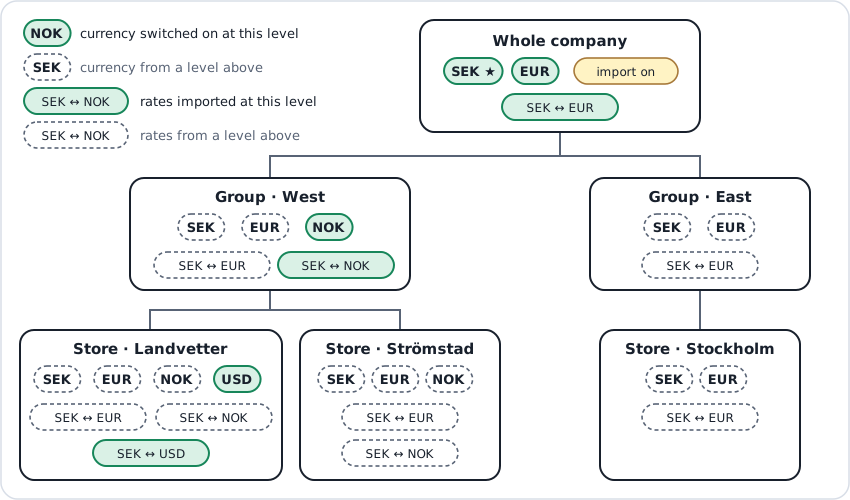
In this example the import is switched on for the whole company:
- The company takes SEK, its home currency, and EUR. The SEK ↔ EUR rates are imported on the company, and every store uses them.
- Group West adds NOK for the stores near Norway. The SEK ↔ NOK rates are imported on West.
- Store Landvetter, at the airport, also takes USD. The SEK ↔ USD rates are imported on Landvetter only.
- Strömstad and Stockholm take nothing of their own and simply inherit.
If a level has the import switched off, the rates for the currencies it adds are imported on the first level below it that has the import switched on again.
Which currencies the ECB publishes
The ECB publishes reference rates for these 29 currencies, and the euro is the currency they are all priced in:
AUD BRL CAD CHF CNY CZK DKK GBP HKD HUF IDR ILS INR ISK JPY KRW MXN MYR NOK
NZD PHP PLN RON SEK SGD THB TRY USD ZAR
For any other currency a store takes, such as the UAE dirham, the import has no rate. Send those rates from your ERP through the API.
When it runs
The import runs every night at 02:00 UTC, which is 04:00 in Stockholm and Oslo in summer and 03:00 in winter. It takes the latest rate the ECB has published. The ECB publishes on its business days, in the afternoon, so each night brings the previous business day's rates.

- Weekends and ECB holidays bring no new rate. The import finds the same rate as the night before, nothing changes, and no message is sent.
- A message is sent only when a store's rate actually changes.
- If a night's run fails, the rates stay as they were, and the next night's run brings them up to date.
Keeping the rates tidy
Because the import owns the rates it creates, it also removes the ones that are no longer needed. It does so on its next nightly run, so a change takes effect within 24 hours.

| You… | The next night, the import… |
|---|---|
| switch a currency off in Currency, on a level where the import is on | removes that currency's SALES rates in both directions from that level, including any SALES rate for it set by hand. The stores below receive them as deleted. |
| switch a currency on higher up that a level below already had | removes the lower level's copy of the rates, so its stores use the higher level's rate. |
| change the home currency of a level | imports the rates for the new home currency and removes the ones it imported for the old one. With only two currencies, nothing changes, because both directions are there already. |
| switch the import off for a level | leaves the rates it imported on that level as they are. They are now yours to keep up to date. Rates the level inherits from a level above that still imports keep updating. |
| switch the import on again | takes its rates back and brings them up to date, replacing any changes made by hand to those rates in between. It also removes the rates of currencies switched off while it was off. |
⚠ The handover happens at the next nightly run. If you switch a currency off and switch the import off on the same day, the currency's rates stay, because by 02:00 the import is no longer in charge of them. Switch the currency off first and the import off the day after if you want the rates gone.
Rates the import never touches
PURCHASEandINTERCOMPANYrates. The import only ever creates and removesSALESrates.- A
SALESrate set by the ERP or by hand on a level where the import does not create that rate. It stays, and it wins over the imported rate the level inherits, until someone deletes it. That is how a store or a group keeps a rate of its own while the rest of the company imports.
⚠ A rate the import creates on a level is replaced every night. Changing it by hand lasts only until 02:00. To keep some margin on an imported rate, set a markup, which the import never touches. To keep a rate fixed, switch the import off for that level.
Checklist
Before switching the import on for a level, check that:
- the currencies its stores take are switched on in Currency;
- it has a default currency, of its own or from the level above, and that currency is one of those it takes;
- it takes at least two currencies, and the ones other than the euro are in the ECB's list above.