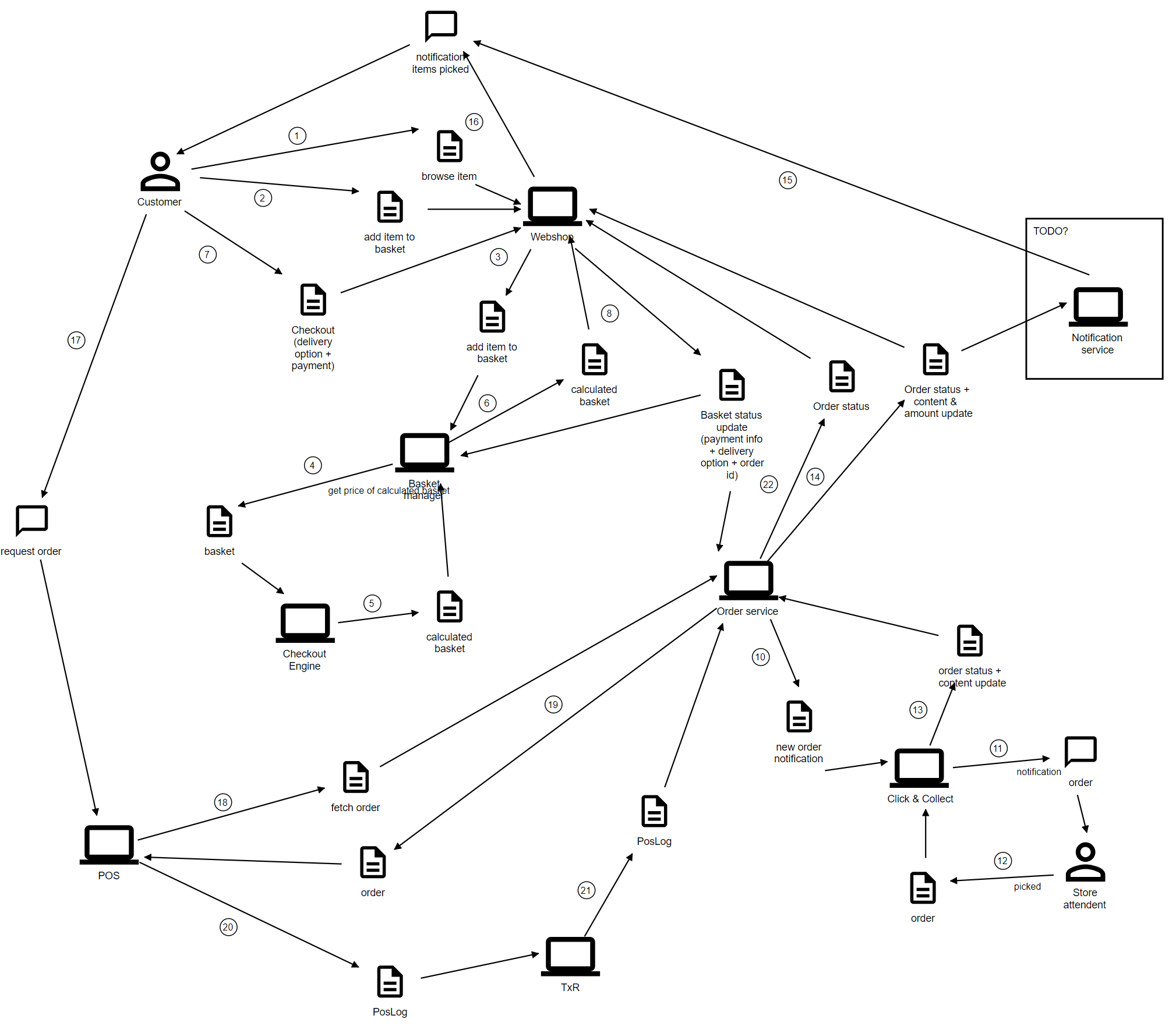
Online order - fetch in a store
A customer orders on the webshop, pays part or all of it online, and collects in a store. The store picks the order, and the till completes it when the customer collects.

- The customer orders on the webshop. The basket is priced and checked out in Unified Basket Manager, and the customer pays some or all of it online. Checkout creates the customer order.
- The store picks the order. Customer Order hands the store's share to Click and Collect. Staff pick it on a handset, and the fulfillment becomes
READY_FOR_PICKUP. - The customer is told the order is ready, by the channel they ordered from.
- The customer collects at the till. The colleague finds the order and the customer pays whatever is left, sometimes nothing.
- The receipt completes the order. The till's transaction reaches Customer Order, the order becomes
FULFILLED, and the order owner is told.
🛑 Picking does not complete the order; the receipt does. See where the data comes from.
The full message flow
The numbered diagram below shows every message between the systems involved.