API and the General Ledger tool
The General Ledger tool
Extenda uses the General Ledger tool to look at a store's accounts and to correct or resend them. Everything it does goes through the public General Ledger API, so you can do the same from your own systems.
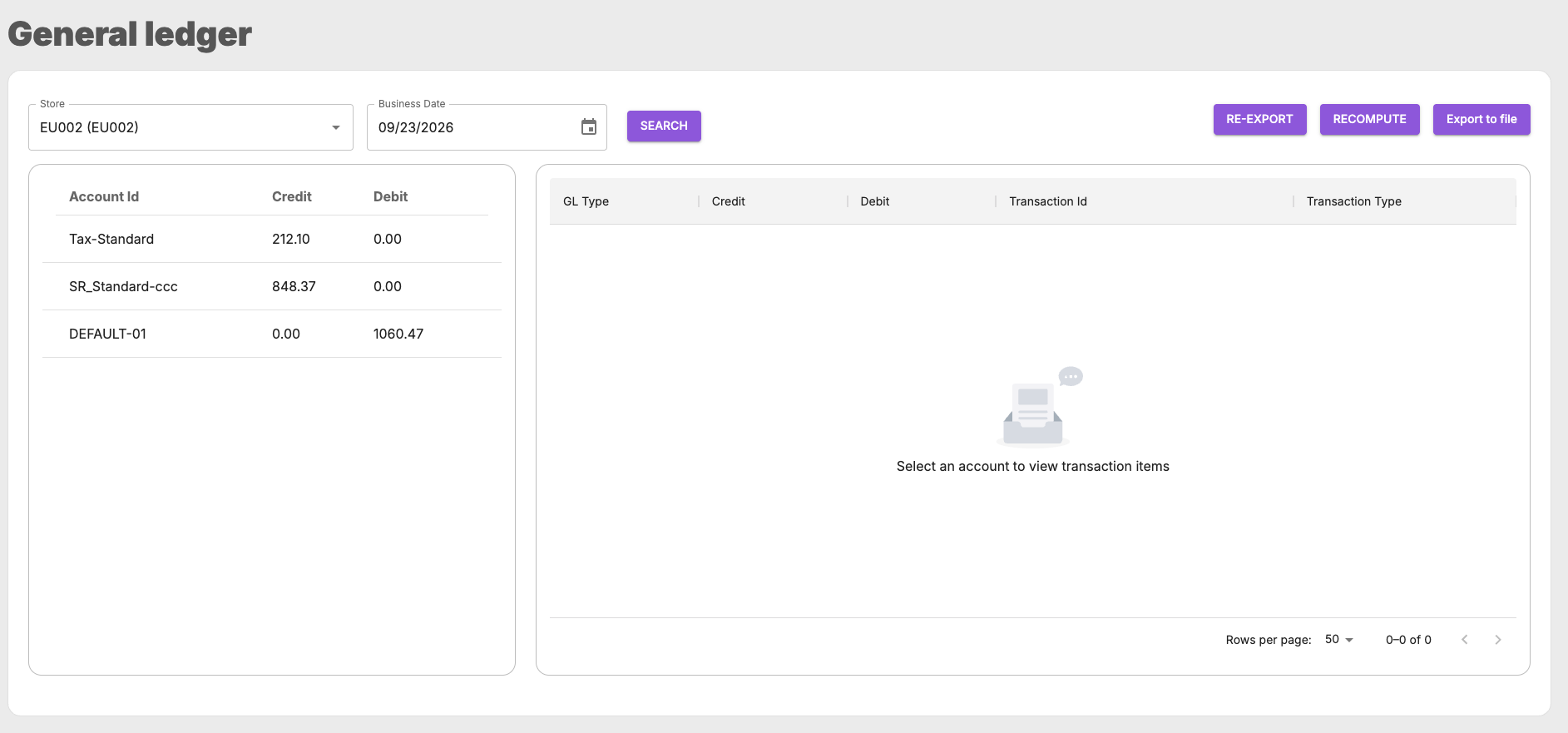
| On screen | What it is | API |
|---|---|---|
| Store and Business Date, then Search | chooses the business unit and day | — |
| Left table: Account Id, Credit, Debit | the day's total per account, as calculated now | GET …/general-ledgers:aggregations |
| Right table: GL Type, Credit, Debit, Transaction Id, Transaction Type | the postings behind the account you select | POST …/transactions:search |
| RECOMPUTE | recalculates a date range with the current rules and sends the difference. See Correcting and resending. | POST …/general-ledger-replay |
| RE-EXPORT | resends the journals already sent for a date range, unchanged | POST …/general-ledger-re-export |
| Export to file | downloads the day's postings as a spreadsheet | POST …/transactions:xls |
The screenshot shows a balanced day: the sales account SR_Standard-ccc (848.37) and the tax account Tax-Standard
(212.10) are credited, and the tender account DEFAULT-01 is debited with their sum, 1060.47.
⚠ "As calculated now" can be ahead of what has been sent. The account table includes transactions that have arrived but not been exported yet, for example today's, or a late transaction waiting for tonight's export. The spreadsheet's Account summary sheet shows what has been exported. If the two differ, the difference is what the next journal will contain.
Endpoints
Base URL: https://general-ledger-api.retailsvc.com/api/v1. The full request and response schemas are in the
API reference.
Look at a store's day
GET /tenants/{tenantId}/business-units/{businessUnitId}/general-ledgers:aggregations?businessDate=2026-09-23
Returns the day's total per account (accountId, amountCredit, amountDebit), as calculated now.
Permission: gle.general-ledger.aggregations.
Find the transactions behind an account
POST /tenants/{tenantId}/transactions:search?take=50&skip=0
{ "businessDate": "2026-09-23", "businessUnitIds": ["EU002"], "accountId": "SR_Standard-ccc" }
businessDate is required. businessUnitIds, accountId and transactionId narrow the result. Each posting
returned has:
| Field | Meaning |
|---|---|
transactionId | the POS transaction |
accountId, amountCredit, amountDebit | where it was posted, and how much |
generalLedgerType | what kind of amount it is: SALE, RETURN, TAX, TENDER, ROUNDING, INCOME, EXPENSE, GIFTCARD |
typeId | the value that decided the account, for example the tax group, the tender or the reason code. The tool shows it as Transaction Type. |
Permission: gle.general-ledger.transactions.
Download as a spreadsheet
POST /tenants/{tenantId}/transactions:xls with the same body as the search. businessUnitIds is required here.
- One business unit returns an
.xlsxfile. Several return a.zipwith one file per business unit. A day with nothing to show returns204. - Sheets: Account summary (what has been exported), Sales-Refund, Expense-Income, Taxes, Tenders and Gift cards.
- Requires an IAM user token. Permission:
gle.general-ledger.transactions.
Correct or resend
| Endpoint | Permission | |
|---|---|---|
| Recompute | POST /tenants/{tenantId}/general-ledger-replay | gle.general-ledger.replay |
| Re-export | POST /tenants/{tenantId}/general-ledger-re-export | gle.general-ledger.re-export |
Both take { "businessUnitId": "…", "businessDate": { "from": "…", "to": "…" } }, where businessUnitId is
optional, and both answer 202 with any blocked dates. What each does, and their limits, are in
Correcting and resending.