Stock Query API
Introduction
The Stock Query API is to be used by the POS (or other services) for fetching the stock quantity. The POS can use this API independent of the source being used.
The Stock Query API can serve stock from two different sources, and the caller does not need to know which:
- Hii Retail Stock service — the default. It can be master of the stock, be synchronized by an external master, or a combination of the two — see Synchronizing stock.
- An external system — the request is proxied to a customer's own system, such as an ERP. Configured per tenant; see below.

Reading stock quantities
| Endpoint | Purpose |
|---|---|
POST /stock-query/stock-quantities | Quantities for one or more items across one or more business units. The general-purpose lookup. |
GET /stock-query/business-units/{businessUnitId}/items:current-stock | Current stock for several items in one business unit. |
POST /stock-query/business-units/{businessUnitId}/stock-quantities-closest | Quantities in nearby business units — see below. |
POST /stock-query/items/batchNumber/{batchNumber}/businessPartnerId/{businessPartnerId} | Quantities for a specific batch from a specific supplier, across business units. |
Quantities are returned per stock type. SalesStock is the one that means
"available to sell".
Nearby business units
stock-quantities-closest answers the question a customer asks when an item is out of stock: where else can I get
it? Nearby business units are resolved from Business Unit Management (BUM), then quantities are fetched for those
business units.
Each result carries a stock status rather than only a number:
| Status | Meaning |
|---|---|
IN_STOCK | quantity is above the store's low stock threshold |
LOW_STOCK | quantity is positive but at or below the threshold |
OUT_OF_STOCK | nothing available |
Both the threshold and how many stores are considered are configured per business unit — see
Configuration. The threshold defaults to 0, which means every positive
quantity reports as IN_STOCK; the number of nearby stores defaults to 5.

Batch lookup
items/batchNumber/{batchNumber}/businessPartnerId/{businessPartnerId} finds where a specific batch is, and how
much of it remains. Its typical use is a recall — a supplier reports a problem with one batch and the business
needs to know which stores still hold it and how much.
Investigating stock history
| Endpoint | Purpose |
|---|---|
POST /stock-query/business-units/{businessUnitId}/transactions:search | Search the transaction ledger for a business unit |
GET /stock-query/document-types | List the document types available for the tenant, for use as a search filter |
transactions:search is the answer to "why is the quantity what it is?" Because stock is calculated from an
immutable ledger rather than stored as a number, every movement that contributed to the current quantity can be
retrieved — with its business date, its source document, its cost, and the resulting stock level. This is the first
place to look when a store disputes a quantity.
Inventory reports
| Endpoint | Purpose |
|---|---|
GET /inventory-reports/business-units/{businessUnitId}/suspicious-items | Items that need attention in one business unit |
The suspicious items report flags items whose stock looks wrong, without anyone having to go looking. Each flagged item carries one or more suspicion types:
| Suspicion | Meaning |
|---|---|
NEGATIVE_STOCK | the quantity has gone below zero — more was sold than the system believed existed |
DURABILITY | stock on hand carries a best-before or expiration date that is close or already passed |
SLOWED_SALES | sales over the last 3 days are running at half or less of the item's own average over a reference period — the last 2 weeks by default, 1 to 4 weeks with timeframeInWeeks |
The report also returns the figures behind each flag — expectedDaysToSellOut, expectedExpiresIn,
averageSalesLast3Days, averageSalesReferencePeriod and a slowedSalesFactor — so a store can act on the reason
rather than only the flag. A slowedSalesFactor of 0.5, for example, means sales in the last three days are running
at half the reference average.
Serving stock from an external system
A tenant can have its stock quantities served from its own system instead of Hii Retail's — an ERP such as SAP or M3, or a warehouse system. The POS and every other caller keep using the same endpoint and the same contract; only the source behind it changes.
This is configured per tenant, so POS in tenant A can read from the Hii Retail Stock service while POS in tenant B reads from an external ERP:
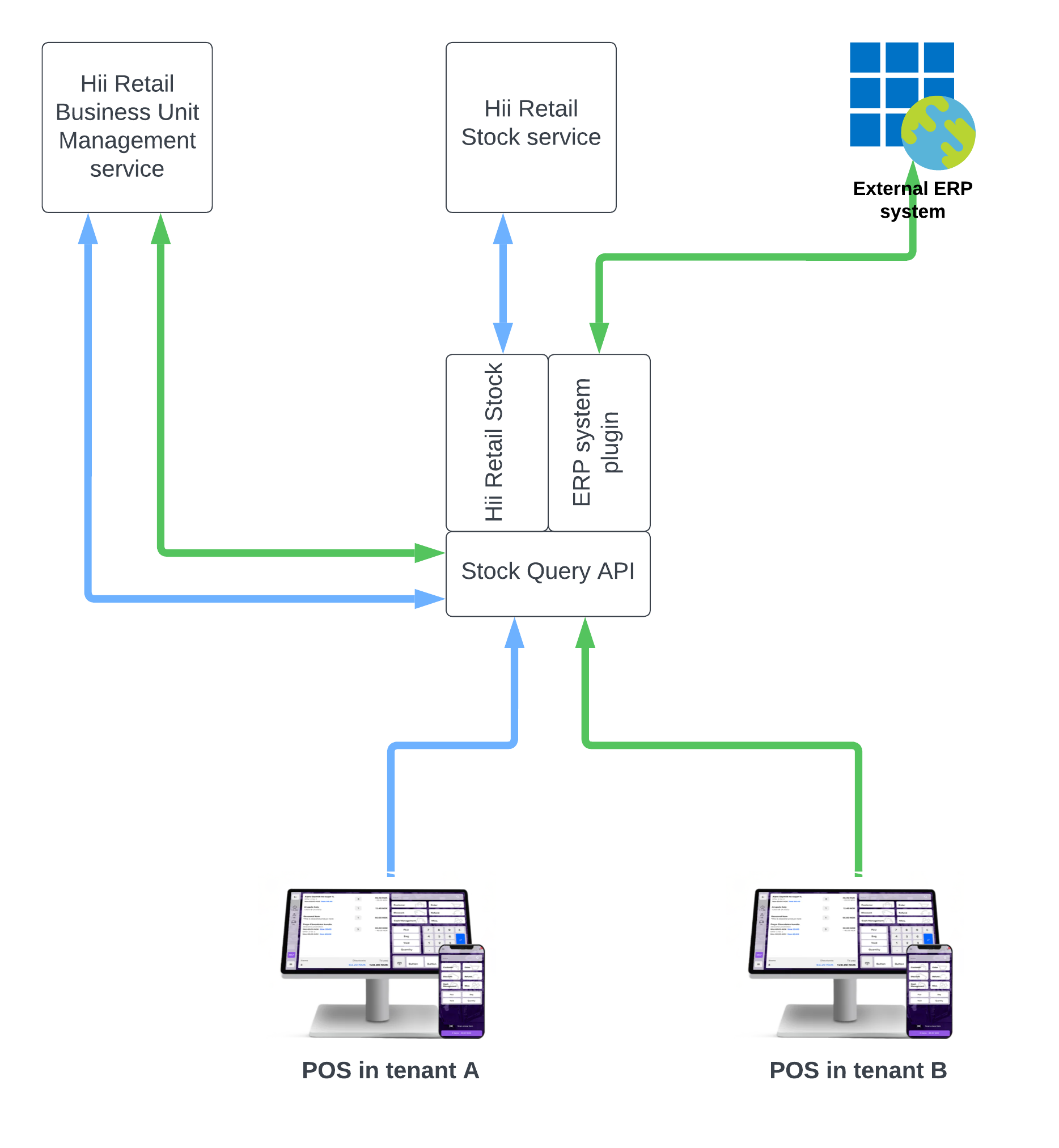
What is proxied, and what is not
🛑 Only
POST /stock-query/stock-quantitiesis proxied. Every other endpoint on this page always serves Hii Retail's own data.

That distinction matters when planning an integration. With a proxy configured, a plain quantity lookup reaches your
system — but the nearby-store lookup, the batch lookup, transactions:search and the suspicious-items report continue
to answer from Hii Retail's stock. Those questions are set-based: they need the whole stock picture, not one item's
quantity, and a per-item proxy cannot supply it. If Hii Retail is not being synchronized, treat those endpoints as
unanswered rather than as a second opinion.
A harder limit applies beyond this API: Stock Count builds its own view from STP's published events, and a proxied lookup publishes nothing — so it sees nothing at all for a proxy-only tenant. See where the lookup proxy stops for which capabilities are affected and why.
Configuring it
Set the configuration through the logistics proxy configuration service, under the service key stock-transaction-query:
PUT https://logistics-proxy-config.retailsvc.com/api/v1/proxy-config?service=stock-transaction-query
The configuration carries the base URL of your system, and credentials for HTTP Basic or OAuth 2.0 client credentials. Hii Retail appends /stock-query/stock-quantities to the URL, so include any prefix and version your system needs. See Proxy configuration for the body, what authUrl may be, and when a change takes effect.
It fails open to Hii Retail
If no proxy configuration exists for a tenant, it has no address, or the stored configuration is not valid (including credentials missing for its type), the request is served from the Hii Retail Stock service instead and the fallback is logged. So a missing or broken proxy configuration degrades to Hii Retail's own quantity rather than failing the call.
⚠ The fallback covers the configuration, not your system. Once a valid configuration points at your system, an
error from that system is returned to the caller: a 4xx as it is, a 5xx or an unreachable system as 502 Bad Gateway, and no answer within the time limit as 504 Gateway Timeout. The request is not retried against Hii Retail.
⚠ Whether that is the behaviour you want depends on your setup. If Hii Retail is being synchronized by your system the fallback is a slightly stale figure — usually preferable to an error at the till. If it is not synchronized, the fallback is a quantity with no relationship to your stock. Decide which case you are in before relying on it.
⚠ A proxied lookup is only as fresh as the system behind it. ERP systems often do not update stock in real time, so a proxy can return a quantity that is hours old. Where near-real-time accuracy at the till matters, the combination in Synchronizing stock — external master, with Hii Retail processing POS sales between synchronizations — usually serves the POS better than proxying.